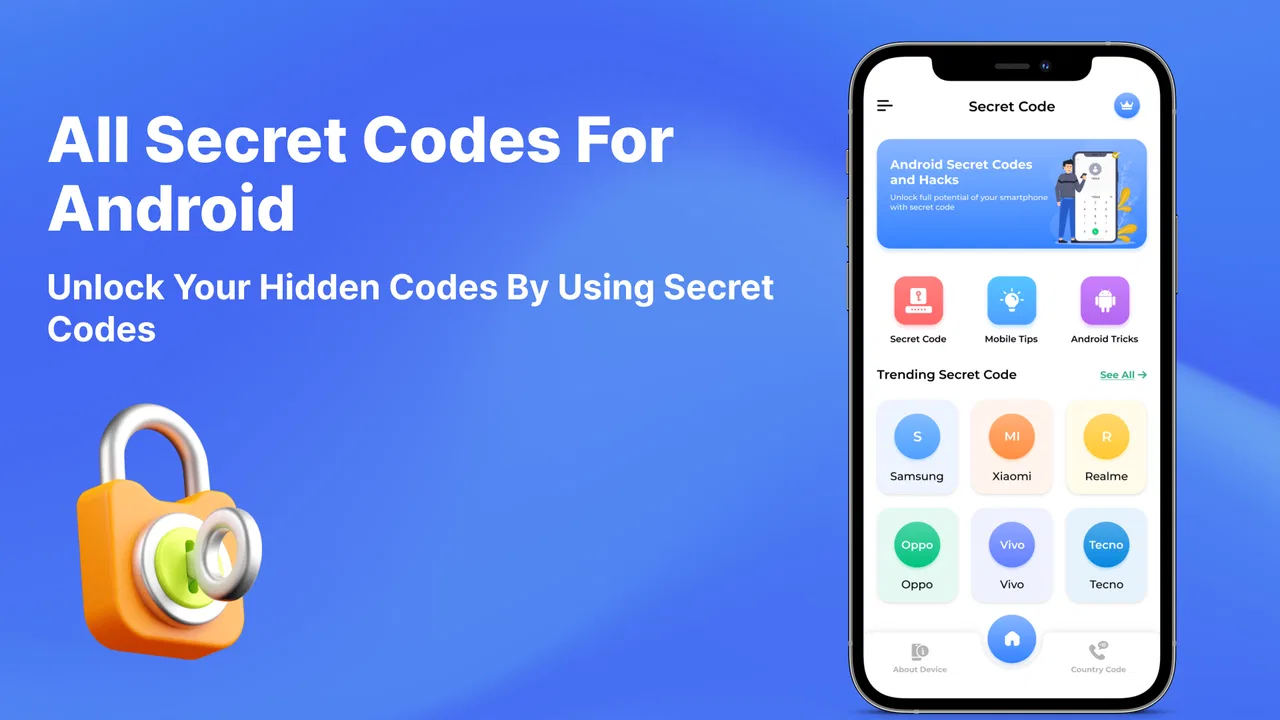
All mobile Secret Codes
- 3.8
- Rating
- 500.00K
- Installs
- Free
- Price

 Analysis by App-foxy
I spent time with All mobile Secret Codes as a practical reference tool rather than as a typical daily app. Its purpose is straightforward: it gathers Android phone codes in one place so I can look up commands that may reveal device information, open diagnostic screens, or reach settings that are otherwise buried behind menus. The idea is useful, especially when I am helping someone troubleshoot a phone and do not want to search the web while holding the device in my other hand.
The app comes from Theoca Apps and sits in the Libraries & Demo section. It is free to install, although optional in-app purchases range from $0.99 to $7.99 per item. That combination makes the initial test easy, but I still recommend treating any purchase as a convenience decision rather than assuming every listed code will work on every handset. Android codes are strongly affected by the manufacturer, model, software build, carrier, and sometimes the country where the phone is used.
How the code library feels to use
The first thing I noticed is that this is a lookup app, not a guided repair assistant. That distinction matters. It can help me find a code, but it does not turn an unfamiliar diagnostic screen into a step-by-step tutorial. For someone who already understands the difference between checking information and changing a system setting, that directness is welcome. For a first-time Android user, the same directness may feel abrupt.
You May Also Like

 Blood Strike: 2.5 Anniversary
Blood Strike’s Loadouts Turn Every Drop Into a Tactical Gamble
A close look at Blood Strike’s custom loadouts: how fast access to signature weapons reshapes its battle royale rhythm, rewards preparation, and narrows the gap between fights.

 Pandora - Music & Podcasts
Pandora’s Music Is Easy to Start, but Harder to Recover
Pandora’s strength is its low-effort path from a seed to a station. Its weak spot is how much confidence it asks you to place in connection, setup, and quiet recovery.

 8 Ball Pool
 Is Built on Rivalries, Rematches, and Routine
A close look at the rivalries, rematches, shared routines, and unanswered safety questions that turn a quick pool match into a persistent mobile community.

 Samsung Music
’s Quiet Strength Is Playing What You Already Own
Its reach comes less from spectacle than from dependable access to a personal library. That simplicity is both the app’s strongest retention engine and its ceiling.

 AccuWeather: Weather Radar
AccuWeather Review: A Quick, Clear Forecast for Everyday Decisions
For everyday plans, the best forecast is the one you can understand quickly. AccuWeather makes rain timing, radar, and local conditions easy to act on, with a few trade-offs.

 Hill Climb Racing
Why Hill Climb Racing Still Turns Crashes Into One More Run
A tiny car, a bumpy hill and one more upgrade: Hill Climb Racing keeps resurfacing because its simple chaos makes every near-miss feel personal.
More From Our News Desk



Readability is most important in an app built around short strings of characters. A single misplaced symbol can make a code useless, and a code that looks similar to another one can create confusion. I found the best workflow was to slow down, read the entire entry, and only then enter it in the phone application. I would not rely on quickly glancing at a line while walking, driving, or switching between several open apps.
The app’s category also explains its strengths and weaknesses. It behaves more like a compact reference shelf than a polished settings companion. I can open it when I need a reminder, scan for a relevant entry, and return to the dialer. I should not expect it to automatically detect my exact model, explain every possible result, or guarantee that a code is available on my network.
For navigation, a simple reference layout can be more accessible than a crowded technical website. There are fewer distractions, and the information is kept close to the task. On the other hand, users who need strong filtering, detailed grouping, or extensive explanations may find the experience less comfortable than a well-organized manufacturer support page. The app is most effective when I already know what I am trying to check.
I also recommend copying the code mentally in small sections rather than treating it as an ordinary sentence. For example, I look for the opening symbol, the middle numbers, and the closing symbol separately. This small habit reduces mistakes when vision is tired or when the display is being viewed in bright light. It is a more useful accessibility practice here than simply increasing the amount of information on screen.
What the app is good at for everyday troubleshooting
A realistic use case is helping a family member whose phone is behaving strangely. Imagine that mobile service appears inconsistent, the person wants to inspect device information, or a technician has asked for a particular diagnostic screen. Instead of searching through several forum posts, I can open the library, locate the relevant entry, and try it in the phone’s dialer. If it works, I save time and avoid asking the user to navigate a complicated settings tree.
Another useful situation is preparing for a repair appointment. I can use the app as a reminder of possible information a technician may request, then write down the results before handing over the device. This is especially helpful when the owner is not comfortable exploring system menus. The app does not replace a repair professional, but it can make the conversation more efficient.
There is also value for people who test several Android phones. A code reference is quicker than remembering which manufacturer places a particular diagnostic option under which menu. That said, I would test a non-destructive information code first and avoid experimenting with anything that appears to reset, erase, reconfigure, or alter network behavior. A reference library should support careful checking, not encourage random tapping.
One practical tip is to keep the app separate from the phone’s actual dialer workflow. I read the entry, remember or note it, close the reference, and then enter it deliberately. This avoids switching back and forth while a code is partially typed. It also gives me a moment to consider whether the command could change something rather than merely display information.
Readability, motor control, and sensory comfort
The app can suit users who prefer a focused visual reference, but its usefulness depends on how comfortably they can distinguish symbols and numbers. Codes are unforgiving: a star, hash sign, or repeated digit is not decorative punctuation. Anyone with reduced vision, dyslexia, hand tremors, or difficulty maintaining focus may need a slower process and a second person to verify the entry.
For motor accessibility, the main challenge is not necessarily opening the app; it is transferring a precise code into another interface. I would not describe that as a minor detail. The user may need to hold the phone, switch applications, open the dialer, and type a sequence without losing their place. A stylus, voice-assisted reading, or a helper reading the code aloud may make the task more manageable, but those are user strategies rather than features I would attribute to the app.
Users with hearing-related needs are not placed at an obvious disadvantage when the task is simply reading a code and viewing information on screen. However, some diagnostic results may require understanding technical labels rather than sound. Someone who depends on visual communication can still use the reference, but may need additional written explanation from a support person if the resulting screen is unfamiliar.
For users sensitive to visual clutter, the narrow purpose is a positive. I am not dealing with a social feed, animated game space, or a large collection of unrelated tools. The trade-off is that a compact code list may not provide enough context around each command. A short entry can be visually clean while still being cognitively demanding.
Text-to-speech users should approach each code carefully. Screen reading can help with surrounding descriptions, but symbols and repeated characters may be spoken in a way that is easy to misinterpret. I would verify the sequence visually or with another person before entering it. This is one of the clearest cases where an app can be usable in principle but still require a safer personal workflow.
Different phones, networks, and situations
The biggest practical limitation is compatibility. Android is not one uniform environment. A code that opens a useful screen on one phone may do nothing on another, show a different screen, or be blocked by the manufacturer or carrier. The app is therefore best viewed as a collection of possibilities, not a promise that every command will work on the device in my hand.
This affects how I compare it with the usual alternatives. A web search can provide newer model-specific instructions and user reports, but it may bury the answer under advertisements, copied lists, or contradictory comments. The app is faster for a general lookup. A manufacturer’s support page is usually better when I need instructions tailored to one exact model. The phone’s own Settings application is safer for ordinary changes because it explains the option in context, even if reaching the same information takes longer.
In a low-connectivity situation, a locally available reference can be more convenient than searching online, provided the needed content is already accessible inside the app. I would still avoid assuming that offline availability means the code itself will function without network support. The command may depend on the phone’s software or carrier systems, not on the reference app.
The app may also help in a support conversation where the phone owner has limited technical vocabulary. Instead of asking them to describe a hidden menu, I can look for a relevant code and compare what appears on screen. This can reduce verbal complexity. Yet the approach is not ideal for someone who needs a fully guided, low-risk process, because the app does not appear to transform technical commands into plain-language decision trees.
It is suitable for adults and older children who can follow careful instructions, but the Everyone content rating should not be mistaken for a safety guarantee around every code. A child may be able to open the app while still not understanding the consequences of entering a command. I would supervise younger users and anyone who is likely to test entries out of curiosity.
Where the experience still creates barriers
The most important barrier is the gap between finding a code and understanding its result. A diagnostic menu can contain abbreviations, engineering terms, or controls that look harmless but are not intended for casual use. The app’s value depends on the reader bringing enough judgment to stop when an entry is unclear.
Another barrier is the lack of certainty across devices. If I am troubleshooting a phone for someone with limited time, trying several codes can create frustration quickly. A model-specific guide may be a better choice when the task is urgent or when the user cannot afford an unexpected change. I would use this app for discovery and confirmation, not as my only source during a high-stakes repair.
There is also a cognitive load issue. A long reference list can be helpful to an experienced user but overwhelming to someone who does not know the difference between network information, hardware testing, and reset-related commands. Clearer grouping and plain-language warnings would make a tool like this more inclusive, but I would not assume that every entry provides that level of guidance.
The optional purchases deserve a practical mention too. Since the basic app is free, I would first test whether its available reference material covers my phone and my specific reason for opening it. I would not pay simply because a code looks interesting. A purchase makes sense only if it removes a genuine limitation for my workflow and I understand what I am getting.
Version 1.17 is the current version, and the app runs on Android 7.0 or later. That broad operating-system reach is useful for people keeping an older phone in service, but it does not solve manufacturer compatibility. An older Android version may support the app while still presenting different menus or restrictions than a newer handset.
Who should use it, and who should choose something else
I would recommend it to curious Android owners, family tech helpers, repair learners, and people who occasionally need a quick code reference. It is particularly handy when the alternative is scrolling through unreliable search results while trying to remember a technical sequence. The developer, Theoca Apps, has focused the product on a narrow job, and that focus is its main appeal.
I would skip it if I want a complete phone-maintenance suite, automatic device detection, or guided explanations for every result. I would also choose a manufacturer manual or official support channel when the phone is business-critical, when a reset is involved, or when I need instructions guaranteed for one model. This app is a reference aid, not a substitute for device-specific support.
Its audience response is reasonably encouraging: the app has a 4.0 average from over 400 ratings and has passed 100K installs. Those figures suggest that it has found a real audience, although they do not tell me whether a particular code will work on my phone. I treat the rating as a sign that the concept is useful, not as proof of universal compatibility.
My own recommendation is to use it with a three-step rule: identify the purpose, verify the code character by character, and stop before entering anything that sounds destructive or unfamiliar. I would also record the phone model and Android version before troubleshooting, because that context helps explain why one result differs from another. This small amount of preparation makes the app much more useful and reduces needless experimentation.
My inclusive verdict
All mobile Secret Codes is a focused, free Android reference app that can make obscure phone information easier to reach. I like it most when I already have a clear question and need a compact place to look before opening the dialer. Its simple role can support different users and situations, but accessibility here depends heavily on careful reading, precise input, and the ability to interpret technical results.
The app is not the best answer for every ability or every troubleshooting context. People who need large, highly guided instructions, model-specific certainty, or protection from risky system commands may be better served by official support documentation or help from another person. Users with visual or motor difficulties can still find value in it, especially with verification and assistive tools, but the code-entry step remains a genuine barrier.
Overall, I see it as a useful pocket reference rather than a universal solution. It earns a place on my phone when I want quick access to Android codes and understand their limitations. If I approach it cautiously, it saves time; if I treat every entry as guaranteed or harmless, it becomes the wrong tool. That balance is the key to getting practical value from this small but specialized app.
FAQs for All mobile Secret Codes
01What are mobile secret codes and how do they work?
Mobile secret codes are a sequence of characters and numbers that can be entered into a smartphone to access hidden features or settings. They work by communicating directly with the phone’s operating system, allowing users to perform tasks such as accessing diagnostics, checking hardware information, or resetting certain settings. These codes vary by device and manufacturer.
02Are mobile secret codes safe to use on my device?
While many mobile secret codes are safe and can provide useful information or features, some may alter settings or data on your device. It is crucial to understand the purpose of each code before using it. Always ensure to enter codes carefully and consider backing up your device to prevent data loss.
03Can mobile secret codes void my warranty?
Using mobile secret codes generally does not void your warranty, especially if the codes are intended for diagnostics or information retrieval. However, codes that alter system settings or perform resets may risk warranty implications. It’s advisable to check with your device manufacturer or service provider if you have concerns.
04Do mobile secret codes work on all smartphones?
Not all mobile secret codes work universally across all smartphones. Codes can be specific to certain manufacturers, models, or operating systems. For instance, a code that works on a Samsung device may not work on an iPhone. Always ensure to use the correct code for your specific device to avoid any issues.
05How can I find mobile secret codes for my specific device?
Mobile secret codes for specific devices can often be found through user manuals, manufacturer websites, or tech forums. Apps like 'All Mobile Secret Codes' can also provide a comprehensive list tailored to different brands and models. Always verify the reliability of your sources before using any codes.
Pros
- Unlocks hidden features easily.
- No rooting required for access.
- Covers a wide range of devices.
- User-friendly interface for beginners.
- Regular updates with new codes.
Cons
- Potential risk of voiding warranty.
- Requires careful use to avoid issues.
- Limited support for some models.
- Not all codes work on every device.
- May cause unintended system changes.

All mobile Secret Codes
Gallery